
SketchUp – ArchiCAD: a unique connection
Graphisoft made software available for connecting ArchiCAD and SketchUp in autumn 2005. The integration of sketches from SketchUp into the virtual building of ArchiCAD significantly eliminates the time needed to "transform" a sketch into a drawing, thus fulfilling a long-standing dream of many architects.
SketchUp
SketchUp, a product of @Last Software, has been on our market since 2003 and has already gained well-deserved attention from architects. The original intention of this program was to provide a system focused on creating the conceptual phase of design. SketchUp combines "pencil sketching" with the speed and flexibility of digital technologies. It is a powerful tool for creating 3D concepts quickly and easily.
Martin Rosa: Revitalization of a former distillery and design of an extension of the site for the needs of a new exhibition gallery, studio work at FA VUT in Brno 2006. SketchUp was used for the conceptual solution of the task.
CAD manufacturers have long been testing various "electronic sketchbooks" and their connection to the CAD environment. However, experience so far confirms that creating a successful (widely used) electronic sketchbook is a very difficult task. Essentially, SketchUp is the first solution of this type that has really "caught on" in practice. Perhaps this is because SketchUp does not pretend to be a pencil, but acknowledges that it is a computer program controlled by a mouse. Although SketchUp is a comprehensive tool, with outputs being the final product, it can also serve as a "predecessor" to construction CAD. This option is precisely what Graphisoft has offered to ArchiCAD users. The connection of SketchUp and ArchiCAD brings several significant advantages:
The communication add-on needs to be installed in ArchiCAD (supported are ArchiCAD 9 for both Windows and Apple). Then, the data format .skp (SketchUp) will be offered in the "File/open" or "File/attach" commands. The "translation" from SketchUp to ArchiCAD takes place either automatically or based on individual definitions of the properties of the transferred objects. The converted data meet the following conditions: SketchUp elements are transformed into ArchiCAD objects (vertical surfaces into walls, horizontal surfaces into slabs, slanted surfaces into roofs, and components into objects, windows, and doors). A sketch of a multi-story building will load correctly into the virtual building environment if it is "sliced" in SketchUp according to the heights of individual floors – ArchiCAD will automatically create the floors. If the communication parameters are set individually, this setting can be saved and revisited at any time.
However, the basic requirement for meaningful integration of SketchUp with ArchiCAD is adherence to its logic: SketchUp is a sketchbook and not a final tool. The study of the building is therefore only created with its shell, without addressing, for example, the thickness of the walls. If a wall is indicated in SketchUp as a block, two walls would be created in ArchiCAD from both its inner and outer surfaces, resulting in two walls instead of one.
The dialog window of the communication bridge for setting the conversion of SketchUp files to ArchiCAD. During automatic conversion, SketchUp components are transformed into new ArchiCAD library elements. Vertical surfaces transform into walls, horizontal into slabs, and slanted into roofs.
Dialog windows of the communication bridge for setting the conversion of SketchUp files to ArchiCAD. During manual conversion, SketchUp components are replaced by existing library elements from the ArchiCAD library. The transformation of surfaces can be set individually, i.e., for example, vertical surfaces in SketchUp can be categorized (according to layers) and different types of walls assigned to each category.
The integration of SketchUp with ArchiCAD ensures a smooth transition from spatial sketch to drawing documentation. SketchUp serves as a sketchbook, the sketches of which do not need to be redrawn into the CAD environment, but are loaded there. In the design studio, an environment emerges that eliminates work duplication and reduces the risk of errors. SketchUp is a program that can be worked on for just a few hours a week, and yet its operation is not forgotten. Therefore, it belongs in the hands of leading architects, whose main task is to devise the concept, not to deal with technical documentation. Nevertheless, SketchUp is a computer program controlled by a mouse, and its aim is not to erase the pencil from the surface of the earth.
Tomáš Lejsek
lejsek@cegra.cz
SketchUp
SketchUp, a product of @Last Software, has been on our market since 2003 and has already gained well-deserved attention from architects. The original intention of this program was to provide a system focused on creating the conceptual phase of design. SketchUp combines "pencil sketching" with the speed and flexibility of digital technologies. It is a powerful tool for creating 3D concepts quickly and easily.
 |
Martin Rosa: Revitalization of a former distillery and design of an extension of the site for the needs of a new exhibition gallery, studio work at FA VUT in Brno 2006. SketchUp was used for the conceptual solution of the task.
Transformation of a sketch into a drawing
CAD manufacturers have long been testing various "electronic sketchbooks" and their connection to the CAD environment. However, experience so far confirms that creating a successful (widely used) electronic sketchbook is a very difficult task. Essentially, SketchUp is the first solution of this type that has really "caught on" in practice. Perhaps this is because SketchUp does not pretend to be a pencil, but acknowledges that it is a computer program controlled by a mouse. Although SketchUp is a comprehensive tool, with outputs being the final product, it can also serve as a "predecessor" to construction CAD. This option is precisely what Graphisoft has offered to ArchiCAD users. The connection of SketchUp and ArchiCAD brings several significant advantages:
- it is possible to work with quantities and fairly precise construction cost data already during "sketching"
- the spatial sketch is largely automatically transformed into a 3D model within the virtual building, from which all necessary 2D documents (floor plans, sections, and elevations) are generated
- significant reduction of the conceptual design - project documentation process
- reduced costs for processing project documentation and reduced risk of errors arising from communication between the architect and the designer
Description of the technology
The communication add-on needs to be installed in ArchiCAD (supported are ArchiCAD 9 for both Windows and Apple). Then, the data format .skp (SketchUp) will be offered in the "File/open" or "File/attach" commands. The "translation" from SketchUp to ArchiCAD takes place either automatically or based on individual definitions of the properties of the transferred objects. The converted data meet the following conditions: SketchUp elements are transformed into ArchiCAD objects (vertical surfaces into walls, horizontal surfaces into slabs, slanted surfaces into roofs, and components into objects, windows, and doors). A sketch of a multi-story building will load correctly into the virtual building environment if it is "sliced" in SketchUp according to the heights of individual floors – ArchiCAD will automatically create the floors. If the communication parameters are set individually, this setting can be saved and revisited at any time.
However, the basic requirement for meaningful integration of SketchUp with ArchiCAD is adherence to its logic: SketchUp is a sketchbook and not a final tool. The study of the building is therefore only created with its shell, without addressing, for example, the thickness of the walls. If a wall is indicated in SketchUp as a block, two walls would be created in ArchiCAD from both its inner and outer surfaces, resulting in two walls instead of one.
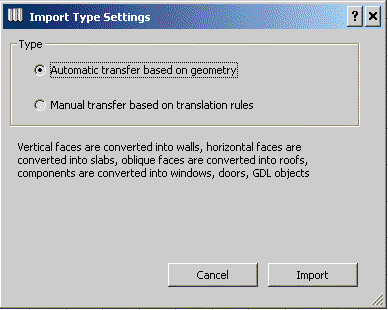 |
The dialog window of the communication bridge for setting the conversion of SketchUp files to ArchiCAD. During automatic conversion, SketchUp components are transformed into new ArchiCAD library elements. Vertical surfaces transform into walls, horizontal into slabs, and slanted into roofs.
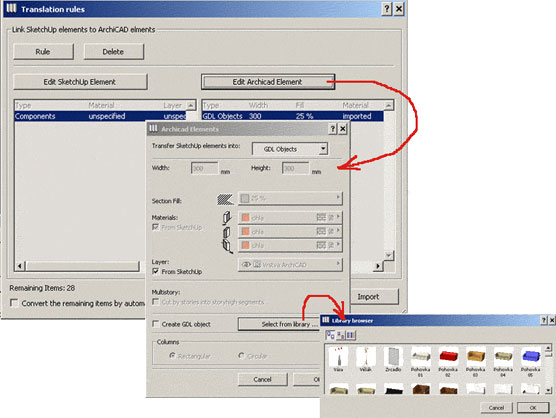 |
Dialog windows of the communication bridge for setting the conversion of SketchUp files to ArchiCAD. During manual conversion, SketchUp components are replaced by existing library elements from the ArchiCAD library. The transformation of surfaces can be set individually, i.e., for example, vertical surfaces in SketchUp can be categorized (according to layers) and different types of walls assigned to each category.
Recap
The integration of SketchUp with ArchiCAD ensures a smooth transition from spatial sketch to drawing documentation. SketchUp serves as a sketchbook, the sketches of which do not need to be redrawn into the CAD environment, but are loaded there. In the design studio, an environment emerges that eliminates work duplication and reduces the risk of errors. SketchUp is a program that can be worked on for just a few hours a week, and yet its operation is not forgotten. Therefore, it belongs in the hands of leading architects, whose main task is to devise the concept, not to deal with technical documentation. Nevertheless, SketchUp is a computer program controlled by a mouse, and its aim is not to erase the pencil from the surface of the earth.
- the connecting software (add-on) between ArchiCAD and SketchUp is available for free download at www.graphisoft.com/products/archicad/energize9/sketchup.html
- the price of SketchUp is 15,500 CZK + 19% VAT
Tomáš Lejsek
lejsek@cegra.cz
The English translation is powered by AI tool. Switch to Czech to view the original text source.